Hotfolder
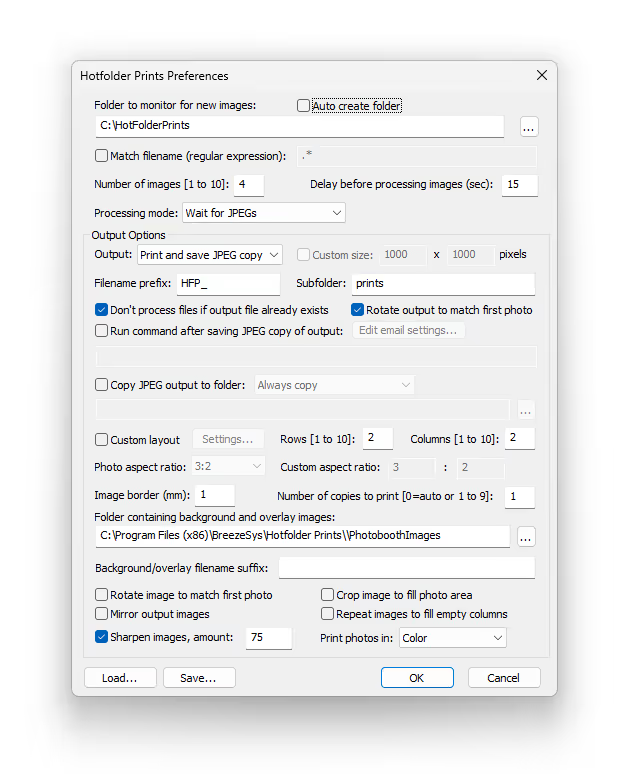
Watch Folder Printing Software for Windows. HotFolder is a light weight utility that watches a folder of incoming images or videos, and then reformats them for automatic printing and new digital copies.
$229 per license | $129 per upgrade
Auto Print
Hotfolder monitors a folder for incoming images (jpegs and PNG’s), then automatically formats them for printing, saving and/or emailing.
Auto Format
Ideal for event photographers and photo booth owners to reformat images for slideshows or digital sharing, or batch processing of images.
Watch Any Folder
Images can be sourced from a tethered camera, a cloud drive (Dropbox etc), shared network folder or a folder on your PC.
Features
- JPG, PNG & MP4 — Monitor incoming images and perform actions in real time
- Design Templates — Design layouts for prints and digital images and save them as templates.
- XML — Integrate with 3rd party applications by using XML.
- Image Sharpening — Apply Breeze HQ sharpening to images on the fly
- Multiple Data Sources — Monitor incoming images from network drives, cloud storage and more
- Data Sharing — Easily share data between other Breeze software
GDPR Compliant. Offline Redundancy.
HotFolder can optionally be used 100% offline with no personal data or images being sent to any 3rd parties including Breeze. All data can be stored locally on device.
Features & Pricing
Hotfolder — $229
- $229 per license, includes 12 months of updates (or upgrade for $129)
- $129 per upgrade of any license
Feature List
Demo / Trial
| Feature | Hotfolder |
|---|---|
| 15 Day Trial | ✓ |
Watch Folder & Media Support
| Feature | Hotfolder |
|---|---|
| Breeze Remote Pro, Breeze Booth | ✓ |
| Dropbox, Google Drive etc. | ✓ |
| Network Drives | ✓ |
| Local Folder | ✓ |
| .jpg, .png, .mp4, .mov | ✓ |
| Token support for Dynamic Folder Monitoring | ✓ |
Printer Support
| Feature | Hotfolder |
|---|---|
| Windows Compatible Printers | ✓ |
| Direct Wired Printing | ✓ |
Hardware Support
| Feature | Hotfolder |
|---|---|
| Windows 10+ | ✓ |
| Intel x86 Based processors | ✓ |
| ARM/Snapdragon Processors | NA |
| Keyboard Control | ✓ |
Printing & Output
| Feature | Hotfolder |
|---|---|
| Save Digital Copies | ✓ |
| Auto Printing | ✓ |
| Custom Layouts | ✓ |
| Drag and Drop Layout Editor | ✓ |
| Default Print Quantity | ✓ |
| Text on Layouts | ✓ |
| Overlays and Backgrounds | ✓ |
| Auto Rotate Images to Fit | ✓ |
| Auto Fill Layouts | ✓ |
| Color, B&W Filters | ✓ |
Sharing
| Feature | Hotfolder |
|---|---|
| Email (custom html) | ✓ |
Get Started with Breeze Hotfolder
Quick start guides:
- Creating an Event
- Connecting Cameras and Printers
- Uploading to Cloud
- Customising Overlays
Download Free Trial
The Hotfolder trial is fully featured and non time restricted. All output will be watermarked.