Downloader Pro
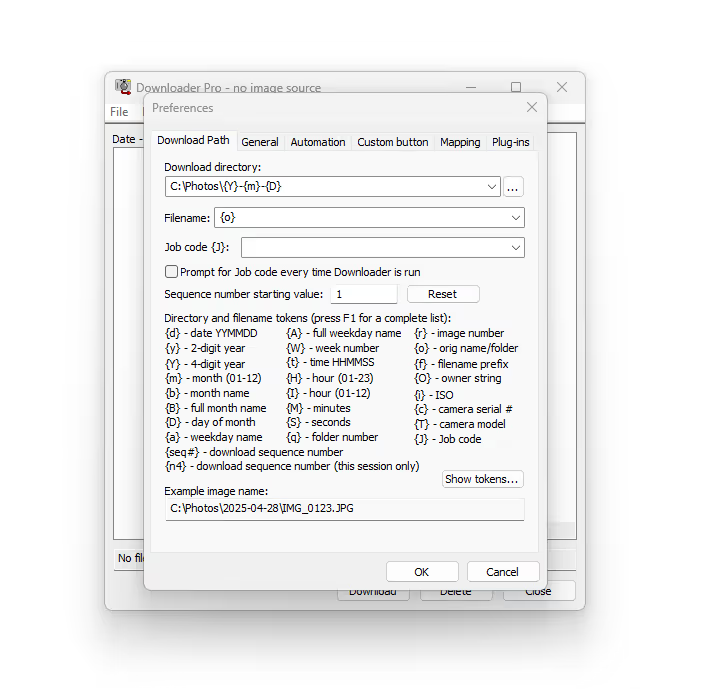
Image Transfer software for Windows. Downloader Pro is a fast and simple tool to transfer images from your camera and store them on your PC. Automatically rename and organise photos in a meaningful way, using filenames and directory tokens.
$79 per license
Media & Camera Support
All JPEGs
Download JPEG images from all camera makes
Most RAW and Movie Files
Canon, Nikon, Olympus, Pentax, Fuji, Sony, Panasonic, Leica, Sigma and Hasselblad Card readers & cameras mounted to a Windows drive
BreezeBrowser Pro Integration
Run BreezeBrowser Pro from Downloader. Start Downloader from BreezeBrowser Pro
Workflow
Automated Directories
Supports single & multiple day jobs. Automate creation of sets of related directories (eg Job XYZ\Originals, JobXYZ\working, JobXYZ\Final). Specify download path using shooting data, date & time, and other tokens. Download images from different cameras to different folders
Handy Plugins
Make up to two backup copies of each image as it is downloaded, using the smart Backup Plugin
DNG Convertor Plugin
Use the DNG Convert Plugin to convert your raw files to Adobe’s DNG format for easy editing. Supports the compatibility options in Adobe’s latest DNG converter. Convert raw files from latest cameras to DNG files compatible with older versions of Photoshop and Lightroom. No need to upgrade Photoshop/Lightroom just to support new cameras
Features
- Camera recognition — Full integration with Browser Pro for quick organisation.
- Breeze integration — Full integration with Browser Pro for quick organisation.
- Backup images — Make up to two backup copies of each image as downloaded.
- Convert raw files — Automatically convert raw files to Adobe’s DNG format.
- Synchronize clocks — Synchronize Canon camera clock with the clock on your PC.
- Direct download — Download directly from most Canon EOS digital cameras.
- IPTC/XMP data — Store photo caption and location information as downloaded.
- Supports — JPEGS, raw and movie files from most camera makes.
- Sub-second timing — Read sub-second timing from shooting data to uniquely name images from continuous sequences
Features & Pricing
Downloader Pro — $79
per license includes 12 months of updates
Feature List
Core Functions
| Feature | Downloader Pro |
|---|---|
| Auto download from card/camera | ✓ |
| Auto-launch on insert | ✓ |
| Rename folders/files on download | ✓ |
| Supports JPEG, RAW, video | ✓ |
| Thumbnail previews | ✓ |
| One-click downloading | ✓ |
Hardware Support
| Feature | Downloader Pro |
|---|---|
| Windows 10+ | ✓ |
| Intel x86 Based processors | ✓ |
| ARM/Snapdragon Processors | N/A |
File Organization
| Feature | Downloader Pro |
|---|---|
| Date-based folder names | ✓ |
| Job code tagging | ✓ |
| Camera model/owner folders | ✓ |
| Sequence numbers | ✓ |
| Uniqueness tokens | ✓ |
| Supports filename tokens | ✓ |
Metadata & IPTC/XMP
| Feature | Downloader Pro |
|---|---|
| Auto IPTC/XMP embedding | ✓ |
| Edit and save metadata sets | ✓ |
| Supports XMP sidecars | ✓ |
| Legacy IPTC IIM support | ✓ |
| Use tokens in metadata | ✓ |
| Controlled vocabulary keywords | ✓ |
Geo-Tagging
| Feature | Downloader Pro |
|---|---|
| Auto GPS tagging via track logs | ✓ |
| Geonames place name lookup | ✓ |
| KML and Google Maps support | ✓ |
| Supports NMEA, GPX formats | ✓ |
| Set camera clock/time offset | ✓ |
Plugins & Extensions
| Feature | Downloader Pro |
|---|---|
| Color profile embedding | ✓ |
| Auto DPI setting | ✓ |
| Workflow folder creation | ✓ |
| Backup to multiple locations | ✓ |
Multi-Camera Support
| Feature | Downloader Pro |
|---|---|
| Profile-based settings | ✓ |
| Map camera serial/model to folder | ✓ |
| Separate workflows per camera | ✓ |
Advanced Features
| Feature | Downloader Pro |
|---|---|
| Supports WAV, AVI playback | ✓ |
| Command line launch options | ✓ |
| Custom buttons | ✓ |
| User profiles for presets | ✓ |
| Custom IPTC/filename tokens | ✓ |
Interface & Display
| Feature | Downloader Pro |
|---|---|
| Small/large thumbnails | ✓ |
| List view mode | ✓ |
| File status indicators | ✓ |
| Hide downloaded/duplicates | ✓ |
| Sort by filename, date, size | ✓ |
Device Compatibility
| Feature | Downloader Pro |
|---|---|
| Supports Canon/Nikon RAW | ✓ |
| Card readers and external drives | ✓ |
| Works with GPS devices like Sony CS1 | ✓ |
| PTP download disabling on Win10 | ✓ |
Utilities
| Feature | Downloader Pro |
|---|---|
| Auto-delete from card post-download | ✓ |
| Sound alert on complete | ✓ |
| Show/download status logs | ✓ |
| Save settings to registry | ✓ |
| Export/import preferences | ✓ |
Download Demo
15 day free trial for Downloader Pro