Browser Pro
Smart Image Processing software for Windows. Browser Pro is a light weight utility that allows you to cull and organise images, create proofs, contact sheets, web galleries, slideshows and more
$149 per license
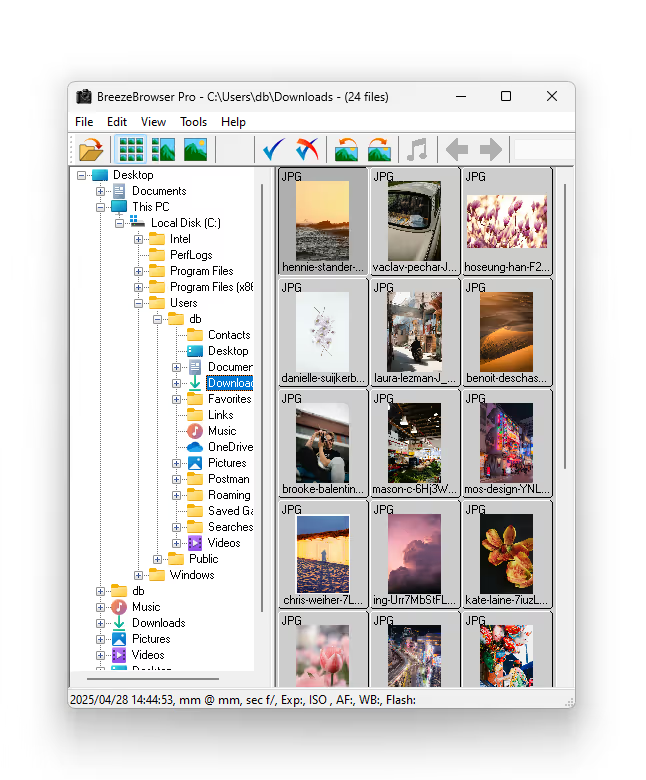
Image Layout
Single Image
Zoom into edit an image full size, enhance with sharpening and noise reduction, and play with colour.
Thumbnails
See instant thumbnails of all images to help browse, sort, select, tag, rank, compare and delete images.
Filmstrip View
BreezeBrowser Pro lets users browse through their images in a handy filmstrip view, as well as web galleries and slideshows.
Breeze FX — Learn more
Features
Single Image
View specific focus points on each photo, grid overlay, flashing highlights (over exposed parts of an image), full sized image and magnified image, plus shooting and metadata.
Enhance and Manipulate Images
Apply our unique HQ sharpening algorithm, rotation, resizing, and noise reduction
Batch Processing
Web page generation, contact sheet printing, multiple image renaming and rotation have never been easier.
Feature Highlights
- Select images — Browse, sort, select, tag, rank, compare and delete images.
- Contact sheets and strips — Create proofs, contact sheets, web galleries and slideshows.
- Enhance images — Resizing and noise reduction.
- Image sharpening — Apply Breeze unique HQ sharpening to images
- See image data — See Canon DSLR photo focus points, grid overlay and flashing highlights.
- Additional views — For easy comparison, toggle between different views.
- Annotate images — Annotate images with text, tokens and IPTC/XMP data.
- Keyword editor — Add and edit keywords in batches of images.
- Room to play — See images in black and white, and play with colour.
Features & Pricing
Browser Pro — $149
per license includes 12 months of updates
Feature List
Viewing Modes
| Feature | Browser Pro |
|---|---|
| Main image view | ✓ |
| Thumbnail view | ✓ |
| Filmstrip view | ✓ |
| Fullscreen slideshow | ✓ |
| Side-by-side comparison | ✓ |
| View actual size | ✓ |
Hardware Support
| Feature | Browser Pro |
|---|---|
| Windows 10+ | ✓ |
| Intel x86 Based processors | ✓ |
| ARM/Snapdragon Processors | N/A |
Image Management
| Feature | Browser Pro |
|---|---|
| Lossless JPEG rotation | ✓ |
| Batch rename images | ✓ |
| Move/copy to folders | ✓ |
| Tagging and ranking | ✓ |
| Shortcut/links support | ✓ |
| Batch delete options | ✓ |
Metadata & Data Handling
| Feature | Browser Pro |
|---|---|
| EXIF viewer and editor | ✓ |
| IPTC metadata support | ✓ |
| Timestamp adjust | ✓ |
| Comment editor with tokens | ✓ |
| Copy/export EXIF data | ✓ |
| Geo-tagging with GPS | ✓ |
Image Output
| Feature | Browser Pro |
|---|---|
| Contact sheets | ✓ |
| Proof creation | ✓ |
| Web galleries (HTML) | ✓ |
| Custom HTML templates | ✓ |
| Color management | ✓ |
| Print to file or printer | ✓ |
File Support
| Feature | Browser Pro |
|---|---|
| JPEG, TIFF, PNG, PSD | ✓ |
| Canon/Nikon RAW preview | ✓ |
| Embedded JPEG extraction | ✓ |
| Regenerate RAW JPEGs | ✓ |
| 16-bit TIFF thumbnail fix | ✓ |
Display Tools
| Feature | Browser Pro |
|---|---|
| Focus point overlay | ✓ |
| Flashing highlights | ✓ |
| Black and white mode | ✓ |
| Grid overlay | ✓ |
| Image magnifier | ✓ |
| High-quality render mode | ✓ |
Kiosk Mode
| Feature | Browser Pro |
|---|---|
| Fullscreen event browser | ✓ |
| Touchscreen interface | ✓ |
| Print & email options | ✓ |
| Custom action menus | ✓ |
| Touch keyboard support | ✓ |
| User token integration | ✓ |
Utilities & Integration
| Feature | Browser Pro |
|---|---|
| HTML token system | ✓ |
| Windows Explorer integration | ✓ |
| Configurable keyboard shortcuts | ✓ |
| Optional registry settings | ✓ |
| Linked editing with image editors | ✓ |
Performance & Settings
| Feature | Browser Pro |
|---|---|
| Custom thumbnail sizes | ✓ |
| Custom sort and filters | ✓ |
| Shoot data sort mode | ✓ |
| Folder auto-monitoring | ✓ |
| Low memory thumbnail handling | ✓ |
| Preference export/import | ✓ |
Download Demo
15 day free trial for BrowserPro